












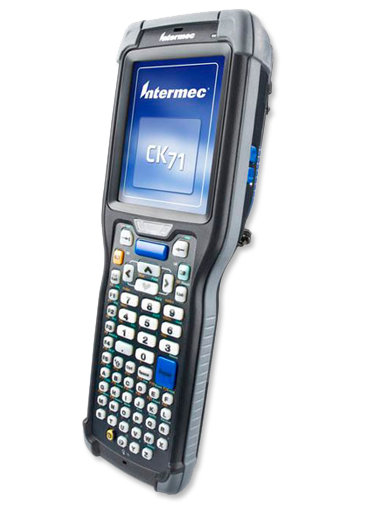
Intermec CK71 · Now a Honeywell device
Sterling Mobile repairs the Intermec CK71 in-house at our Phoenix depot, sells refurbished CK71 units, rents replacements, and buys surplus fleets outright. The CK71 was discontinued years ago, so the four options in front of you are repair, refurbish, rent or sell — and we are one of the few depots that can do all four for the same device.
Intermec became part of Honeywell in 2013, which is why searches for this device return both names. The hardware did not change. A CK71, a CK71A, a Honeywell CK71 and an Intermec CK71 are the same ultra-rugged Windows Embedded Handheld computer, and our bench treats them identically.


Free 90-Day Warranty 5 In-House Technicians 20+ Brands Serviced Phoenix Repair Depot Updated 1 September 2026
What Actually Fails on an Intermec CK71
Most CK71 failures come down to six components, and five of them are replaceable without scrapping the unit. The CK71 was built for cold storage, manufacturing floors and warehouse distribution, so it fails the way rugged hardware fails: at the points that get handled, dropped and cleaned most often.
Use the table below to work out what you are probably looking at before you ship anything. If the symptom is not listed, describe it on our contact form and a technician will tell you whether it is worth repairing.
| Symptom | Usual cause | Typical fix |
|---|---|---|
| Dead or dim display, ghosting | LCD module failure, often after a drop onto the top corner | LCD module replacement |
| Touch input offset, dead zones, cracked glass | Digitiser damage under the screen protector | Touch screen replacement |
| Barcodes will not decode, or decode slowly | Scratched or fogged scan window, or a failing scan engine | Scan window first; scan engine only if the window is clear |
| Will not charge, or charges intermittently | Worn battery connector, or the sync-and-charge flex cable | Battery connector or flex cable replacement |
| Keys unresponsive or doubled | Keypad overlay worn through from repeated use | Keypad overlay replacement |
| Loses time and settings when the battery is swapped | Backup battery has reached end of life | Backup battery replacement |
| Trigger not registering on a gun-grip unit | Trigger mechanism worn or contaminated | Trigger assembly replacement |
| Housing cracked, hand strap torn, stylus missing | Normal wear | Cosmetic and housing parts, no board work needed |
A cracked scan window is the single most common CK71 fault we see, and it is also the cheapest to put right. It is worth checking before you write a unit off, because a fogged window reads exactly like a dead scan engine to the operator holding it.
Check Which Scan Engine Your CK71 Has
The CK71 shipped with three different scan engines, and the one inside yours determines both the repair and whether a replacement unit will match your fleet. This is the detail most repair listings leave out, and it is the thing that causes a "repaired" device to come back reading differently from the rest of your kit.
- EA30 — near/far area imager, the most common configuration in warehouse fleets.
- EX25 — extended-range imager for scanning pallets and racking at distance.
- N5603ER — extended-range imager used in later builds.
Keypads also vary: CK71 units were built with either a 43-key or a 59-key alphanumeric layout, and the front housings are not interchangeable between them. When you send a unit in, tell us the keypad count if you know it. If you do not, we will identify it on the bench and match it. The full CK71 configuration options are listed in the spec sheet.
Repair, Refurbish, Rent or Sell: Four Paths for an Ageing CK71
The right answer depends on how many units you run and how long you intend to keep the platform. Most repair companies can only offer you the first column, which is why the decision usually gets framed as repair-or-replace when there are really four options.
| Your situation | Best path | Why |
|---|---|---|
| One or two units down, fleet otherwise healthy | Repair | Keeps your existing configuration and imaging intact |
| Fleet shrinking through attrition, no spares left | Buy refurbished | Refurbished hardware typically costs 25–50% less than new |
| Seasonal peak, inventory count, or a unit out for repair | Rent | Short and long-term rentals cover the gap without capital spend |
| Migrating to Android, CK71s sitting in a cupboard | Sell to us | Our buyback program purchases surplus and used scanning equipment |
If you are running a mixed fleet of discontinued Honeywell and Intermec hardware, our Honeywell end-of-life repair service covers the wider platform, and our Honeywell scanner troubleshooting guide walks through the resets worth trying first.
What Windows Embedded Handheld End of Life Means for Your CK71
The CK71 runs Microsoft Windows Embedded Handheld, which Microsoft no longer supports, and that is the real reason fleets are being retired rather than any hardware weakness. The devices themselves keep working. What stops is security patching and, eventually, compatibility with the systems they talk to.
This matters for your repair decision in a specific way: if your warehouse management system still runs on terminal emulation and your CK71s do their job, repairing them is usually the cheaper path for the remaining life of the platform. If you are already piloting Android hardware, the calculation flips toward selling the CK71 fleet while it still has residual value. You can read Microsoft's position on supported lifecycles in its product lifecycle documentation, and Honeywell continues to publish device support material through its productivity solutions support portal.
Either way, do not scrap the units. Surplus CK71s hold value as parts donors and working spares, and equipment that genuinely cannot be recovered should go through responsible electronics recycling rather than a skip — the e-Stewards standard explains what that involves.
How Sterling Mobile Repairs Your CK71
Every CK71 is repaired in our own Phoenix depot by our own technicians, with nothing outsourced to a third party. We keep five in-house dedicated technicians who service more than 20 brands and hundreds of models, and the CK71 is a platform we have worked on since Intermec still had its own name on it.
The bench process is the same for every unit that arrives:
- Teardown and diagnosis — the reported fault is confirmed, and the unit is checked for the secondary damage that usually comes with it.
- Cleaning — warehouse dust and cold-store condensation are removed from the housing, scan window and connectors.
- Part replacement — failed components are replaced, with the scan engine and keypad configuration matched to what came in.
- Testing to manufacturer specification — scanning, charging, keypad and display are all verified before the unit is packed.
Repairs are available flat-rate or per-incident, with no maintenance contract required, and Sterling Mobile Complete Care can cover refurbished hardware for up to three years. Every repair carries a free 90-day warranty, and the same warranty applies to refurbished units we sell. Our warranty and returns terms set out exactly what is covered.
Ship Your CK71 In, or Drop It Off in Phoenix
You can send a CK71 to our depot from anywhere in the country, or bring it to us if you are local. The depot sits on South 24th Street in the South Phoenix industrial corridor, minutes from Sky Harbor and the I-10, which is why operations teams in Tempe, Chandler, Mesa, Scottsdale and Glendale tend to drop off rather than ship.
For a fleet of handhelds, shipping is straightforward and rarely worth avoiding — a CK71 is a handheld, not a 40-pound industrial printer. Before you send anything, follow our repair packing list so the unit arrives with everything the bench needs, and read more about the Phoenix repair depot if you want to see how the operation runs.
Sterling Mobile Services
5631 S 24th St, Phoenix, AZ 85040
Phone: (480) 785-4711 · Fax: (480) 785-4717
Email: info@sterlingmobile.com
Hours: Monday–Friday, 8:00 AM – 5:00 PM Arizona time. Closed Saturday and Sunday.
Intermec CK71 Repair FAQs
Do you repair the Intermec CK71 even though it is discontinued?
Yes. Discontinued hardware is a core part of what our depot does. The manufacturer has moved on from the CK71, which is precisely why an independent depot is the practical option — we still repair the platform, and we keep working on devices long after the brand behind them has been absorbed into somebody else.
Is a Honeywell CK71 the same as an Intermec CK71?
Yes, it is the same device. Honeywell acquired Intermec in 2013 and the CK71 carried on under the Honeywell name. Parts, scan engines and repair procedures are identical, so it does not matter which name is printed on the unit you send us.
Can you repair my CK71 if I do not know what is wrong with it?
Yes. Send it in with a description of what the operator sees and our technicians will diagnose it on the bench. Vague symptoms are normal — "it stopped scanning" covers a scratched window, a failing engine and a damaged flex cable, and telling those apart is our job rather than yours.
Do you buy used Intermec CK71 units?
Yes, through our Barcode Scanner Buyback Program. We purchase surplus and used barcode and scanning equipment, including full fleets being retired during an Android migration. Send us the model, quantity and rough condition through the sell your equipment form and we will come back to you.
Can I rent a replacement while my CK71 is being repaired?
Yes. We hold rental stock for short-term and long-term hire, which operations teams commonly use to cover inventory counts, seasonal peaks and repair turnaround. Details are on our equipment rentals page.
Get Your CK71 Back in Service
Tell us what the device is doing and our technicians will tell you whether it is worth repairing — before you ship it. Every repair carries a free 90-day warranty.