
Inventory Count Planning Guide
- Ships Nationwide
- Phoenix Depot Pickup
- 5 In-House Technicians
- Rent-to-Own Available
- Updated October 26, 2026
For a once-a-year physical inventory, renting barcode scanners almost always costs less than buying them. Buy when the scanners will be used every week for cycle counts, receiving or picking. The deciding factors are how often you count, how many extra counters you need on count day, and whether the rented units match the devices your team already uses.
Most companies run their full count at year-end, which makes late December and early January the busiest time to find enough devices. This guide covers which scanners work best for a count, how to work out how many you need, and how to plan the four weeks before count day.
Which Barcode Scanner Is Best for Inventory Counts?
The best scanner for an inventory count is the one your counters can use all day without training, connected the way your inventory software expects. Pick the device type first, then the connection.
| Device type | Example models | Best for |
|---|---|---|
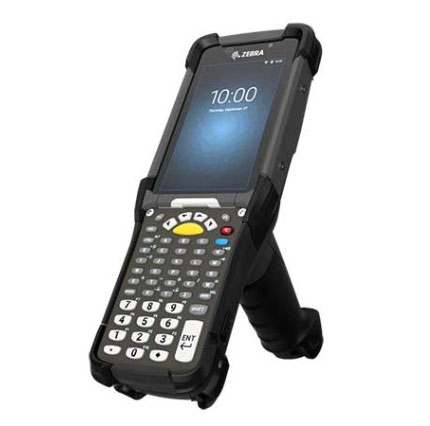
| Gun-grip mobile computer | Zebra MC9300 and the MC9000 series | Wall-to-wall warehouse counts with high scan volume and high shelving; the pistol grip is easier on a long shift |
| Touch mobile computer | Zebra TC-series Android computers | Retail and back-room counts where staff are used to a phone-style screen |
| Handheld scanner | Corded and cordless Zebra, Symbol and Honeywell scanners | Counting stations at a PC or laptop, and adding counters cheaply |
| Long-range scanner | Long-range scan-engine versions of the above | Labels on high racking that counters cannot reach |
Next, decide how scans reach your system. Wireless units send each scan to your inventory or warehouse software in real time over Wi-Fi, so supervisors see progress as the count runs. Batch units store the scans and upload them when docked, which is the safer choice if your Wi-Fi coverage has dead spots. If your host system runs green-screen applications, units can ship with terminal emulation already set up. Most count labels use the 1D and 2D symbologies set out in the GS1 barcode standards, which any of these devices read.
How Many Scanners Do You Need for a Count?
Plan one scanner per counting team, plus spares. The number of teams comes from how many locations you have to count and how long you can stay closed.
- Count your locations. Bins, shelves or pallet positions, from your inventory system.
- Time a sample. Have one team count a typical aisle and note how many locations they finish in an hour.
- Divide. Locations ÷ (locations per team per hour × hours available) = teams needed.
- Add spares. Keep extra units charged for drops, dead batteries and late-arriving staff, and rent extra batteries for a count that runs past one shift.
Worked example
A site with 4,000 locations, where a team counts 100 locations an hour, has 40 team-hours of counting. To finish in an 8-hour shift it needs 5 teams, so 5 scanners plus spares. The same count in 4 hours needs 10. Your own sample count is what makes this accurate, so time one before you book.
Rent or Buy Barcode Scanners for an Inventory Count?
Rent when the extra devices are needed for days, buy when they will be used every week. Owning scanners that sit in a cupboard for 51 weeks a year ties up money in hardware that ages, needs batteries and falls behind on operating system support.
| Option | Best for | What to know |
|---|---|---|
| Rent | Annual or twice-yearly counts, peak-season surges, one-off projects | Short or long terms, configured units, returned when the count ends |
| Rent-to-own | Trying a model in your workflow before committing | Part of the rental cost is credited toward buying the units |
| Buy refurbished | Daily cycle counts, receiving and picking | Typically 25–50% below new, with a free 90-day warranty |
| Buy new | Long deployments on the newest operating system | Highest cost; worth it only when the devices will run for years |
Fleet matching matters more than most teams expect. If your warehouse already runs Zebra mobile computers, renting the same family means your chargers, holsters and training carry over on count day. Tell us the model you already run when you ask for a quote. See our barcode scanner rentals for the full rental fleet, or refurbished barcode scanners if you decide to buy.
Plan the Count: A Four-Week Checklist
Most problems on count day start weeks earlier, with devices booked late or software that was never tested. Work back from your count date.
- Four weeks out: confirm the count date, locations and number of teams, then reserve the scanners.
- Three weeks out: send us your count software or host details so the units can be configured before they ship.
- Two weeks out: check your location and product labels. Faded or damaged labels slow counters down more than any scanner. If your label printer is the problem, our Zebra printer troubleshooting guide covers the common fixes.
- One week out: receive the units, charge them, and run a test count and upload on one aisle.
- After the count: upload and reconcile, then return the units or extend the rental for recounts.
The Zebra MC9300 product page lists the battery and scanning specifications if you are planning a count that runs past one shift.
Phoenix Pickup or Nationwide Shipping
Sterling Mobile ships rental scanners anywhere in the United States, and Phoenix-metro businesses can pick them up from our depot at 5631 S 24th St in the South Phoenix industrial corridor near Sky Harbor. Warehouses in Tempe, Chandler and the West Valley logistics parks around Goodyear and Tolleson can collect units the day before the count and drop them back the day after, with no freight either way. A local depot also means a quick swap if a unit is dropped mid-count.
Inventory Scanner Rental FAQs
How much does it cost to rent a barcode scanner for an inventory count?
Rental pricing depends on the model, the quantity and how long you need the units, so Sterling Mobile quotes each count individually. Call (480) 785-4711 or request a quote with your count date and number of teams. For an annual count, renting usually costs a small fraction of buying scanners that would sit unused the rest of the year.
Can rental scanners run our inventory software?
Yes. Rental units can be loaded with barcode software for inventory counts or custom programs before they ship, and terminal emulation can be configured for host systems that run green-screen applications. Send your software details when you book so the units arrive ready to use.
How far ahead should we book scanners for a year-end count?
Book as soon as you know your count date. Year-end is when most companies count, so late December and early January bookings are the first to fill. Booking three to four weeks ahead also leaves time to configure the units with your software and test them before count day.
Should we use wireless or batch scanners for a count?
Use wireless units when your Wi-Fi covers the whole building and you want to see count progress live. Use batch units when coverage has gaps, such as freezers, mezzanines or yard areas, because they store scans and upload when docked, so nothing is lost when the signal drops.
Can we keep the scanners after the count?
Yes. With rent-to-own, part of the rental cost is credited toward buying the units, which suits teams that want to move to regular cycle counts. If you would rather sell old devices you are replacing, our equipment buyback program buys used scanners, working or not.
Reserve Scanners for Your Count
Tell us your count date, the number of teams and the devices you already run. Units ship configured and charged nationwide, or pick them up at our Phoenix depot.
Call (480) 785-4711 → Request a Free Quote Today! →Scanners breaking down before the count? Our barcode scanner repair service handles Zebra, Honeywell, Motorola and Intermec devices in-house, with a free 90-day warranty.
Phone: (480) 785-4711 · Fax: (480) 785-4717 · info@sterlingmobile.com
5631 S 24th St, Phoenix, AZ 85040
Mon–Fri 8:00 AM – 5:00 PM Arizona time · Sat–Sun closed
Last updated: October 26, 2026